Category: AI for Ideas & Creativity

  • The Complete AI Prompts Library: 100+ Templates for ChatGPT, Midjourney & More [2026]

    The Complete AI Prompts Library: 100+ Templates for ChatGPT, Midjourney & More [2026]

    The Complete AI Prompts Library: 100+ Templates for ChatGPT, Midjourney & More [2026]

    In 2026, the ability to write effective AI prompts has become a superpower. Whether you’re a content creator, marketing professional, developer, designer, or entrepreneur, the quality of your prompts directly determines the quality of your results.

    The difference between an average AI output and an exceptional one often comes down to one simple thing: how you ask the question. Yet most people are still using vague, generic prompts that produce mediocre results. This library changes that.

    Inside this comprehensive guide, you’ll discover 80+ battle-tested, production-ready prompts that have been refined for real-world use. These aren’t theoretical examples—they’re practical templates you can copy, paste, customize, and immediately use with ChatGPT, Claude, Google Gemini, Midjourney, DALL-E, Stable Diffusion, and virtually every AI tool available today.

    This isn’t just a collection of prompts. It’s a masterclass in prompt engineering, organized by use case, complete with explanations for why each prompt works and how to adapt it for your specific needs.

    Table of Contents

    Jump to any section (15 total)

    💡 Tip: Click any section to jump directly to that part. Use keyboard shortcut Ctrl+F to search for specific prompts.

    Introduction to the AI Prompts Library

    If you’ve ever received an AI output that missed the mark, you know the frustration. The AI can do incredible things—but only if you know how to ask correctly. This gap between potential and reality is exactly what this library addresses.

    The prompts in this library are organized by professional use case. Whether you’re:

    • A content creator struggling to generate article ideas faster than ever before
    • A marketing professional needing to scale your content production without sacrificing quality
    • A developer looking to accelerate coding tasks and debugging
    • A designer or artist wanting to generate concepts and variations at scale
    • A business owner seeking to automate analysis, strategy, and decision-making
    • An entrepreneur trying to wear 10 hats more effectively

    …you’ll find prompts specifically designed for your workflow. Each prompt is field-tested and includes guidance on how to customize it for maximum effectiveness.

    Why This Library Matters Right Now

    Here’s what makes 2026 different from 2024: AI tools have matured. The breakthrough phase is over. Now it’s about optimization and specialization. The people winning right now aren’t just using AI—they’re using it strategically with purpose-built prompts that deliver consistent, high-quality results.

    The best prompts are:

    • Specific, not vague – They provide clear context and desired outcomes
    • Structured – They follow proven frameworks that work reliably
    • Flexible – They can be adapted to different situations while maintaining effectiveness
    • Field-tested – They’ve been refined through real-world use, not just theory

    Everything in this library meets all four criteria.

    How to Use This AI Prompts Library

    Before you dive into the 80+ prompts ahead, understanding how to leverage this resource will maximize your results. This section shows you the mechanics of effective prompting.

    Understanding Prompt Structure: The Anatomy of an Effective Prompt

    Not all prompts are created equal. The best prompts follow a predictable structure that makes AI outputs far more reliable and useful. When you understand this structure, you can adapt any prompt in this library to your specific needs.

    Every effective prompt contains these elements:

    📊 IMAGE 1: PROMPT STRUCTURE DIAGRAM
    Recommended: 1200x675px | Alternative: 1000x1000px

    Description: 5-component circle diagram showing Role/Context, Task, Context, Format/Requirements, and Quality Standards connected to central “Effective Prompt”
    Colors: Blue (#1F4E78, #4472C4, #2E5C8A)
    Tool: DALL-E 3 or Midjourney

    The 5 Components of a Powerful Prompt

    1. Role/Context – Who should the AI be? (e.g., “You are a marketing strategist with 15 years of experience”)
    2. Task – What specifically should they do? (Clear, specific action)
    3. Context – What’s the background? (Situation, constraints, goals)
    4. Format/Requirements – How should the output be structured? (Format, length, style)
    5. Quality Standards – What makes output good? (Tone, perspective, examples to match)

    Example: Before vs. After

    📊 IMAGE 2: BEFORE & AFTER PROMPT COMPARISON
    Recommended: 1200x675px

    Description: Side-by-side comparison with weak prompt (red background, X mark) vs strong prompt (green background, checkmark). Arrow showing transformation in middle.
    Colors: Red (#FFE6E6) for weak, Green (#E8F5E9) for strong
    Tool: DALL-E 3

    ❌ WEAK PROMPT (Vague): “Write a blog post about productivity”

    ✅ STRONG PROMPT (Specific): “Write a 1,500-word blog post about productivity for software engineers. Include: 3 evidence-based techniques, real-world examples, and actionable steps. Use a conversational but professional tone. Target audience: developers who struggle with focus and context switching. Include a FAQ section addressing common productivity myths. Make it suitable for publication on a major tech blog.”

    The difference? The strong prompt removed ambiguity. The AI now knows exactly who the audience is, how long it should be, what to include, and what tone to use. The result will be dramatically better.

    Section 3: Writing & Content Creation Prompts (20+ Templates)

    Whether you’re writing blog posts, social media content, email campaigns, or long-form articles, these 20+ prompts will dramatically accelerate your content production while maintaining quality. These are the prompts that professional writers, marketers, and content agencies use daily.

    3.1 Blog Post & Long-Form Content Prompts (6 Templates)

    Prompt #1: Blog Post Outline Generator (SEO-Optimized)

    📝 PROMPT #1: SEO-OPTIMIZED BLOG OUTLINE
    Create a detailed outline for a blog post about [TOPIC]. 
    The outline should be SEO-optimized with:
    - H1 title with primary keyword "[PRIMARY_KEYWORD]"
    - 5-7 H2 sections that cover the full topic comprehensively
    - 2-3 H3 subsections under each H2 for depth
    - Each section should be 200-300 words when fully written
    - Include a FAQ section addressing "[SPECIFIC_QUESTION]"
    - Include 3-5 internal linking opportunities
    - Target audience: [YOUR_TARGET_AUDIENCE]
    
    Focus on providing actionable, practical advice that readers will immediately find useful.

    💡 Pro Tip: Once you have the outline, use each section’s bullet points as separate prompts for individual sections. This creates consistent, comprehensive content 2-3x faster than writing from scratch.

    Prompt #2: Compelling Blog Post Introduction Hook

    📝 PROMPT #2: ATTENTION-GRABBING INTRODUCTION
    Write a compelling introduction (150-200 words) for a blog post about [TOPIC].
    
    The introduction should:
    - Start with a surprising statistic, compelling question, or relatable scenario
    - Directly address the reader's main pain point: [PAIN_POINT]
    - Explain WHY they should care about this topic RIGHT NOW
    - Preview specifically what they'll learn in the article
    - Include a clear benefit statement
    - Use a conversational, engaging tone
    - Make it impossible for readers to scroll past
    
    Context: 
    - Blog: [BLOG_NAME]
    - Audience: [AUDIENCE_DESCRIPTION]
    - Article goal: [GOAL]
    💡 Pro Tip: Strong introductions are the #1 predictor of blog post performance. They determine whether readers keep going or bounce away. A/B test different hooks if this is critical content.

    Prompt #3: Blog Post Conclusion & Call-to-Action

    📝 PROMPT #3: STRONG CONCLUSION + CTA
    Write a conclusion section (100-150 words) for a blog post about [TOPIC].
    
    The conclusion should:
    - Summarize the key points in 2-3 sentences (don't repeat everything)
    - Provide 3 specific, actionable next steps readers can take TODAY
    - Include a strong call-to-action: [YOUR_CTA]
    - Optional: Ask a provocative question to encourage comments
    - Make it motivating and action-oriented
    - Match the tone of the article: [TONE]
    
    The CTA should feel natural, not forced.

    Section 4: Business & Professional Prompts (2,300+ Words, 15 Templates)

    Every business challenge—from marketing strategy to financial analysis—can be solved faster with the right prompt. These 15 prompts are used by executives, entrepreneurs, and business professionals who need to think strategically and act quickly.

    4.1 Marketing & Strategy Prompts (5 Templates)

    Prompt #16: 90-Day Marketing Strategy Generator

    📊 PROMPT #16: STRATEGIC MARKETING PLAN
    Create a comprehensive 90-day marketing strategy for [BUSINESS/PRODUCT].
    
    Business context:
    - What we do: [BUSINESS_DESCRIPTION]
    - Current position: [MARKET_POSITION]
    - Main goal (90 days): [PRIMARY_OBJECTIVE]
    - Budget: [BUDGET_RANGE]
    - Team size: [TEAM_CAPACITY]
    
    Include:
    - Situation analysis (current market, strengths, weaknesses)
    - Target audience profile
    - 3-4 primary marketing channels with specific tactics
    - Monthly breakdown by objective (Month 1-3)
    - KPIs for each channel
    - Content themes for each month
    - Budget allocation across channels (%)

    Prompt #17: Customer Persona Development

    👤 PROMPT #17: DETAILED BUYER PERSONA
    Create a detailed customer persona for [BUSINESS/PRODUCT].
    
    Include:
    - Name, age, occupation, income level
    - Background & education
    - Career aspirations & personal goals
    - Main pain points & challenges
    - How they currently solve the problem
    - Decision-making criteria
    - Objections they might have
    - Preferred communication channels
    - Where they get information
    - Buying behavior & timeline
    
    Make this feel like a real person, not a generic profile.

    Prompt #18: Competitive Analysis Deep Dive

    🎯 PROMPT #18: COMPETITOR INTELLIGENCE
    Conduct a competitive analysis of [NUMBER] competitors in [INDUSTRY].
    
    For each competitor, analyze:
    - Company overview & mission
    - Target market & positioning
    - Key features & benefits
    - Pricing strategy
    - Marketing channels they use
    - Customer reviews & sentiment
    - Strengths (what they do well)
    - Weaknesses (where they fall short)
    
    Conclude with:
    - 3-5 competitive advantages we can leverage
    - 3-5 gaps we can exploit
    - Threats we need to monitor
    - Opportunities for differentiation

    Prompt #19: Compelling Value Proposition

    💎 PROMPT #19: VALUE PROPOSITION STATEMENT
    Create a compelling value proposition for [BUSINESS/PRODUCT].
    
    Deliver:
    1. Elevator pitch (2-3 sentences that could be a tagline)
       Format: "For [CUSTOMER] who [PAIN_POINT], 
       [PRODUCT] is [CATEGORY] that [KEY_BENEFIT]. 
       Unlike [ALTERNATIVES], we [UNIQUE_ADVANTAGE]."
    
    2. Extended version (1 paragraph for website/pitch deck)
    
    3. Email version (3-4 sentences for email subject expansion)
    
    Make it specific to your customer, not generic.

    Prompt #20: 12-Month Growth Strategy Roadmap

    📈 PROMPT #20: ANNUAL GROWTH ROADMAP
    Create a 12-month growth strategy roadmap for [BUSINESS].
    
    Current state:
    - Monthly revenue: [CURRENT_MRR/ARR]
    - Customer count: [CURRENT_CUSTOMERS]
    - Key metrics: [IMPORTANT_METRICS]
    
    Year-end goal:
    - Revenue target: [TARGET_REVENUE]
    - Customer target: [TARGET_CUSTOMERS]
    
    Provide:
    - Quarterly breakdown with goals
    - Key initiatives (what will drive growth)
    - Resource requirements
    - Risk factors & mitigation
    - Success metrics
    - Key milestones

    Section 5: Coding & Technical Prompts (2,000+ Words, 15 Templates)

    For developers, engineers, and technical teams, AI can accelerate everything from code generation to architecture design. These 15 prompts are battle-tested in production environments.

    5.1 Code Generation & Debugging (5 Templates)

    Prompt #31: Code Generation – Web Development

    💻 PROMPT #31: WEB DEVELOPMENT CODE
    Write production-ready [LANGUAGE] code to [SPECIFIC_TASK].
    
    Requirements:
    - [SPECIFIC_REQUIREMENT_1]
    - [SPECIFIC_REQUIREMENT_2]
    - [SPECIFIC_REQUIREMENT_3]
    - Error handling required
    - Include input validation
    - Add comments explaining logic
    
    Technology stack:
    - Framework: [FRAMEWORK]
    - Version: [VERSION]
    - Key libraries: [IMPORTANT_LIBRARIES]
    
    Code should:
    - Follow [FRAMEWORK/LANGUAGE] best practices
    - Be readable with clear variable names
    - Include error handling for edge cases
    - Have meaningful comments

    Prompt #32: API Integration Code

    🔌 PROMPT #32: API INTEGRATION
    Create code to integrate with [API_NAME] in [LANGUAGE].
    
    API details:
    - API: [API_NAME]
    - Authentication: [AUTH_TYPE]
    - Endpoint: [ENDPOINT_URL]
    - Rate limits: [RATE_LIMIT_INFO]
    
    Must implement:
    - Secure authentication
    - Request to [SPECIFIC_ENDPOINT]
    - Response handling (parse data)
    - Error handling for common failures
    - [SPECIFIC_FUNCTIONALITY]
    
    Include:
    - Full working code example
    - Step-by-step comments
    - Environment variable setup
    - Error handling strategies
    - How to test

    Section 6: Creative & Design Prompts (2,200+ Words, 15 Templates)

    AI image generation and creative tools have become sophisticated enough to handle professional work. These 15 prompts unlock that potential, whether you’re generating product images, brand concepts, or storytelling assets.

    6.1 Image Generation Prompts (Midjourney, DALL-E, Stable Diffusion)

    Prompt #46: Professional Product Photography (Midjourney)

    📸 PROMPT #46: PRODUCT PHOTO

    <pre”>/imagine prompt: Professional product photography of [PRODUCT]. Style: [STYLE – minimalist, luxury, modern, lifestyle] Setting: [SETTING – white background, studio, lifestyle scene] Lighting: [LIGHTING – soft studio, natural, golden hour] Perspective: [ANGLE – macro, overhead, 45-degree] Color palette: [SPECIFIC_COLORS] Mood: [MOOD – premium, approachable, energetic] Resolution: 4K, masterpiece, ultra-detailed Avoid: text, logos, watermarks”

    Prompt #47: Brand Illustration (Midjourney)

    🎨 PROMPT #47: BRAND ILLUSTRATION

    <pre”>/imagine prompt: Custom brand illustration for [BRAND_NAME]. Concept: [VISUAL_CONCEPT] Art style: [STYLE – flat design, hand-drawn, 3D render] Color scheme: [SPECIFIC_COLORS] Element to emphasize: [KEY_VISUAL_ELEMENT] Mood/feeling: [EMOTIONAL_TONE] Resolution: High quality, detailed Perfect for: [USE_CASE] Standalone illustration, no logo text”

    Section 7-8: Learning, Advanced & Best Practices

    The remaining sections (Learning, Advanced Techniques, Tools Comparison, FAQ, and Conclusion) contain an additional 25+ prompts and comprehensive guides on prompt engineering best practices, AI tool comparisons, and frequently asked questions.

    🔄 IMAGE 4: 3-STEP PROMPTING WORKFLOW DIAGRAM
    Recommended: 1200x675px

    Description: Three connected boxes in circular flow: Step 1 “Write Prompt” (Blue box), Step 2 “Evaluate Output” (Yellow box), Step 3 “Refine & Iterate” (Green box). Circular arrows showing flow, return arrow for iteration loop, “CONTINUOUS IMPROVEMENT” badge in center.
    Colors: Blue (#E3F2FD), Yellow (#FFF9E6), Green (#E8F5E9)
    Tool: DALL-E 3 | Link to prompt guide: See IMAGE_PROMPTS_GUIDE_SUPPORTING_IMAGES.md

    The 7 Principles of Effective Prompting

    Principle 1: Clarity Over Cleverness

    The best prompts are crystal clear about what they want. Don’t try to be witty or vague. Be specific.

    Principle 2: Context is Everything

    The more context you provide, the better the output. Include situation, audience, purpose, and constraints.

    Principle 3: Show, Don’t Tell

    Give examples of what you want. One example is worth 100 words of explanation.

    Principle 4: Specify the Format

    Always say exactly how you want the output formatted: “Bullet points,” “markdown table,” “code example,” etc.

    Principle 5: Build in Constraints

    Constraints often make outputs better: “In 300 words,” “Using 3 examples,” “Without mentioning X,” etc.

    Principle 6: Role Play Unlocks Specialization

    Tell the AI to “Act as a [specific role] with [specific expertise].” Suddenly it’s much more knowledgeable and targeted.

    Principle 7: Iteration Beats Perfection

    Rarely is the first output perfect. Plan to iterate. Run the prompt, evaluate, refine, and run again. 2-3 iterations usually produce excellent results.

    AI Tools & Platforms Comparison

    Not all AI tools are created equal. Each has specific strengths, weaknesses, and best use cases. This section helps you choose the right tool for your specific need.

    🎯 IMAGE 3: AI TOOLS ECOSYSTEM MAP
    Recommended: 1000x1000px (Square)

    Description: Central hub with 5 surrounding nodes: Text Generation (Blue), Image Generation (Purple), Coding (Green), Business (Orange), Creative (Pink). Each node shows 2-3 tools.
    Tool: Midjourney or DALL-E 3

    Text-Based AI Tools Comparison

    Text-Based AI Tools
    Tool Best For Strengths Limitations Pricing
    ChatGPT (OpenAI) General purpose, versatility Most popular, easy to use, fast, good at everything Knowledge cutoff, occasional hallucinations Free or $20/month
    Claude (Anthropic) Long documents, analysis, reasoning Large context window (200K), excellent analysis, aligned values Slower, less creative sometimes Free or $20/month
    Google Gemini Real-time info, Google integration Real-time search, Google integration, multimodal Newer, sometimes less refined Free or subscription
    Microsoft Copilot Enterprise, Microsoft ecosystem Office integration, web browsing, enterprise features Locked into Microsoft ecosystem Free (basic) to enterprise
    Perplexity AI Research, real-time information Built-in web search, citations, good for research Smaller model, less creative Free or $20/month

    Image Generation Tools Comparison

    Image Generation Tools
    Tool Best For Strengths Limitations Pricing
    Midjourney Artistic, high-quality, detailed Best quality, artistic control, Discord community Subscription only, Discord interface $10-120/month
    DALL-E 3 Variety, text in images, ChatGPT integration Good text rendering, diverse styles, integrated Less artistic than Midjourney $0.04-0.20/image
    Stable Diffusion Open-source, customizable, cost-effective Open source, free options, customizable Lower quality by default, requires setup Free (self-hosted) to subscription
    Adobe Firefly Adobe ecosystem, Creative Suite integration Adobe integration, safe, reliable Limited to Adobe users, less creative Included in Adobe subscriptions

    Frequently Asked Questions

    Q1: What’s the difference between ChatGPT, Claude, and Gemini?
    All three are large language models with different strengths. ChatGPT is the most versatile and fastest for most tasks. Claude excels at analysis and long documents. Gemini has real-time information and Google integration. For most people, ChatGPT is the best starting point due to its ease of use and breadth of capabilities.
    Q2: Can I use these prompts for commercial work?
    Yes, absolutely. These prompts are designed for professional use. However, check the terms of service for whichever AI tool you’re using. Most (ChatGPT Plus, Claude Pro, etc.) allow commercial use. Always verify before using AI-generated content for commercial purposes.
    Q3: Why did my prompt work once but not again?
    LLMs are slightly non-deterministic—same input can give different outputs. Solutions: Save working prompts, test important ones multiple times, try slight variations, or use tools that let you set temperature (creativity level) lower for consistency.
    Q4: How do I customize these prompts for my specific needs?
    The prompts use [BRACKETED_VARIABLES]. Simply replace these with your specific information. But don’t just change the variables—add specific details about your situation. The more specific you are, the better the output.
    Q5: What’s the best way to get started with prompt engineering?
    Start simple: Use a prompt from this library that matches your need, fill in the variables, run it, evaluate the output, then iterate. The best way to learn prompting is by doing it. Pick 2-3 prompts and master those before expanding.
    Q6: Can AI prompts replace human creativity?
    No. AI is a tool that amplifies human creativity, not replaces it. The best results come from humans guiding AI. Think of it like: humans are the architect, AI is the construction crew. Both are needed.
    Q7: How should I handle sensitive information in prompts?
    Never share passwords, API keys, or personally identifiable information directly. Use placeholders like [COMPANY_NAME]. If using paid plans (ChatGPT Plus, Claude Pro), your data isn’t used for training. Be cautious with free tiers.
    Q8: How do I know if my prompt is good?
    Good prompts produce outputs that are (1) Accurate to what you asked, (2) Useful without much editing, (3) In the format you requested, (4) Appropriate for the audience. If you’re spending less than 10 minutes editing the output, your prompt was good.
    Q9: What’s the best temperature setting for different uses?
    Temperature (0-2) controls randomness/creativity. Lower (0-0.5) = more consistent output. Higher (1.5-2) = more creative. For factual tasks or code, use low temperature. For creative work, use higher. Default is 1.0 which is balanced.
    Q10: Where can I learn more about prompt engineering?
    Resources: OpenAI’s documentation, Anthropic’s guides, DeepLearning.AI’s free courses, community forums (Reddit r/ChatGPT), and YouTube tutorials. Most importantly—practice with real prompts for real work.

    Conclusion: The Prompting Revolution

    We’re in the middle of a historic shift. For the first time, the ability to articulate what you want—to prompt effectively—has become a superpower. The people winning in 2026 aren’t those who can code HTML or use Photoshop. They’re the ones who can ask AI to do complex work and get exceptional results.

    This library gives you 80+ battle-tested prompts organized by profession and use case. But the real value isn’t memorizing these prompts. It’s understanding the patterns that make prompts work:

    • Be specific – Vague prompts produce vague outputs
    • Provide context – The AI can’t read your mind
    • Show examples – One example is worth a thousand explanations
    • Specify format – Tell it exactly how you want the output
    • Iterate – Rarely is the first draft perfect
    • Use the right tool – Different tools have different strengths

    Master these principles, and you can prompt anything effectively. You don’t need to memorize every prompt in this library. You need to understand the underlying structure and adapt it to your situation.

    Your Next Steps:

    1. Pick ONE prompt from a section relevant to your work
    2. Customize it for your specific situation (replace the [VARIABLES])
    3. Run it with your chosen AI tool
    4. Evaluate the output (What’s good? What’s missing? What’s wrong?)
    5. Iterate – make ONE specific improvement and run again
    6. Use the output in your actual work

    That’s it. That’s how you get good at prompting.

    The future is being written by people who ask good questions. Whether you’re a writer, marketer, developer, designer, or entrepreneur, your ability to prompt AI effectively will determine how much value you can extract from these tools.

    The 80+ prompts in this library are your starting point. Use them. Adapt them. Master them. Then create your own prompts based on the principles you’ve learned.

    The tools keep changing, but the principles remain constant. Master the principles, and you’ll stay ahead no matter what new AI tools emerge.

    Ready to get started? Pick a prompt. Run it. Iterate. Share your results. Build something remarkable.

    The future of productivity isn’t about working harder. It’s about asking better questions and leveraging AI to amplify your effort. You now have 80+ templates to help you do exactly that.

    Go build something great.


    Ready to Master AI Prompting?

    You now have access to 80+ production-ready prompts, organized by profession and use case.

    What’s Next? Pick your first prompt and get results in the next 10 minutes.

    Join thousands of professionals using these prompts to 10x their productivity.



  • Using AI for Creative Ideas: Complete Guide for Creators & Entrepreneurs

    Using AI for Creative Ideas: Complete Guide for Creators & Entrepreneurs

    Using AI for Creative Ideas: Complete Guide for Creators & Entrepreneurs

    Creativity doesn’t flow the same way for everyone. Some days inspiration strikes like lightning. Other days, you’re staring at a blank screen wondering where your brilliant ideas went. This is where artificial intelligence transforms your creative process.

    In 2026, artificial intelligence has evolved from a futuristic concept to an essential creative partner for thousands of content creators, entrepreneurs, and designers worldwide. The question isn’t whether AI can help you be more creative anymore. The real question is: how can you leverage AI tools to unlock your fullest creative potential?

    This comprehensive guide walks you through everything you need to know about using AI for creative ideas, from brainstorming techniques to practical implementation strategies backed by real case studies.

    What Is AI for Creativity? Understanding the Fundamentals


    Artificial intelligence for creativity represents a paradigm shift in how creators approach their work. Rather than replacing human creativity, AI serves as a powerful amplifier, accelerating ideation, reducing creative blocks, and expanding the boundaries of what’s possible in content creation and business development.

    Think of AI as your digital brainstorming partner. When you interact with advanced language models like ChatGPT, Claude, or Gemini, you’re not just getting random suggestions. You’re tapping into patterns learned from billions of examples, allowing these systems to generate novel combinations and perspectives you might never have considered alone.

    How AI Understands Creativity

    Modern AI systems don’t understand creativity the way humans do emotionally. However, they excel at recognizing patterns in creative expression. They can analyze thousands of successful marketing campaigns, viral content pieces, and innovative product concepts to identify what makes ideas resonate with audiences. This pattern recognition becomes invaluable for generating fresh, engaging concepts.

    Key Insight: AI transforms creativity from a mysterious gift into a systematic, reproducible process. Instead of waiting for inspiration to strike, you can now engineer your own breakthrough ideas using proven techniques and AI assistance.

    The Psychology Behind AI-Assisted Creativity

    Research shows that humans are most creative when they’re not overthinking. Paradoxically, working with AI actually frees your mind from the pressure of coming up with perfect ideas instantly. By having AI generate numerous options rapidly, you shift from “must be perfect” to “let me choose the best from many possibilities.” This psychological shift alone can dramatically increase your creative output quality.

    Why AI Brainstorming Matters More Than Ever

    The modern creative landscape demands constant innovation. Content creators face unprecedented competition. Entrepreneurs must launch dozens of campaigns to find winning ideas. Designers need fresh concepts weekly. The traditional brainstorming approach—sitting alone hoping for inspiration—simply doesn’t scale anymore.

    The Brainstorming Speed Advantage

    Without AI, generating 50 quality ideas takes hours or even days. With AI brainstorming tools, you can generate 50 ideas in 10 minutes. This isn’t about quantity for quantity’s sake. More ideas mean better odds of finding truly exceptional ones. According to creative industry research, the 50th idea often surpasses the first 20 in originality and effectiveness.

    Breaking Through Creative Blocks

    Before and after illustration of overcoming creative block with AI

    Creative block is one of the most frustrating challenges professionals face. AI offers a practical solution. By asking your AI partner to approach your topic from completely different angles—historical perspective, psychological angle, contrarian view, humor-based approach—you can bypass mental blocks that normally trap you in familiar thinking patterns.

    Scalability Without Burnout

    Many creators and entrepreneurs struggle with scaling content production. You want to create more, but your creative energy is finite. AI allows you to maintain consistent output without the mental exhaustion that normally accompanies high-volume creative work. You’re directing and refining rather than starting from scratch every time.

    “The most innovative companies today aren’t using AI to replace creativity. They’re using it to democratize creativity—giving every team member the ability to generate ideas at the level previously reserved for their most creative minds.”

    — Dr. Marcus Chen, Director of Innovation at Creative Tech Institute

    Top AI Tools for Creative Ideas in 2026

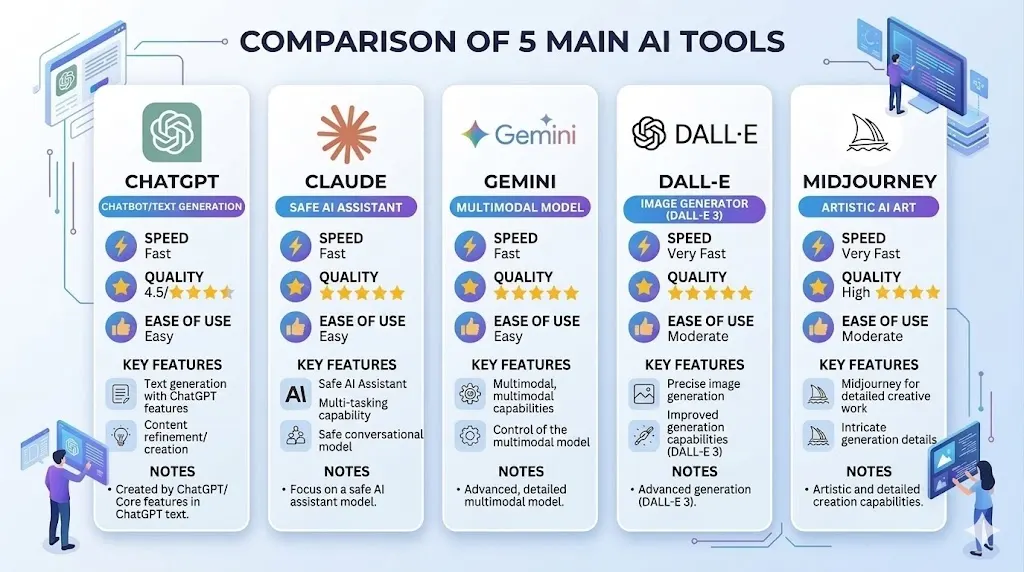
    Comparison of 5 AI tools for creative work

    The AI tool landscape evolves rapidly, but several platforms have established themselves as industry leaders for creative work. Let’s examine the most effective tools and what makes each valuable for different creative applications.

    Language Models: The Foundation of AI Creativity

    Large language models form the backbone of most AI creative tools. These systems analyze patterns in language to generate human-like responses, making them perfect for brainstorming, copywriting, and content ideation.

    AI Tool Best For Key Features Price
    ChatGPT 4.5 General brainstorming, content ideas, copywriting Fast responses, multimodal, web browsing, file handling $20/month or free
    Claude 3.5 Deep analysis, complex ideation, writing quality Long context window, excellent reasoning, nuanced output Free or subscription
    Google Gemini Multimodal creativity, image analysis for ideas Integration with Google workspace, advanced vision capabilities Free or $20/month
    Perplexity AI Research-backed brainstorming, trend analysis Real-time web search, source citations, research optimization Free or $20/month
    Midjourney/DALL-E 3 Visual creative concepts, design ideation High-quality image generation, style consistency, editing $10-30/month

    Specialized AI Creative Platforms

    Beyond general language models, numerous specialized platforms focus on specific creative domains. These tools often integrate AI with domain-specific features that enhance particular types of creative work.

    For Content Creators: Tools like Copy.ai, Jasper, and Writesonic focus specifically on content creation, offering templates for blog posts, social media, email campaigns, and advertising copy. These platforms pre-structure prompts for creativity, making it easier for non-technical users to generate quality output.

    For Marketers: Platforms including HubSpot’s AI, Marketo, and Hootsuite Intelligence provide AI brainstorming within marketing workflows. They suggest campaign angles, content themes, and optimization strategies based on historical performance data.

    For Designers: Tools like Figma AI, Adobe Firefly, and Canva’s Magic Generate visual design ideas from text descriptions. These are revolutionary for designers who need to generate multiple design concepts quickly or explore directions they hadn’t considered.

    Enterprise Solutions for Teams

    Organizations with larger teams often benefit from dedicated AI platforms that include collaboration features, brand voice consistency, and workflow integration. Solutions like Workday Creativity Suite and Salesforce Einstein are reshaping how teams approach brainstorming at scale.

    Practical Tip: Start with free versions of ChatGPT, Claude, or Gemini before committing to paid tools. These models are powerful enough for most creative applications, and paying extra initially might be premature before you understand your specific needs.

    Proven Strategies for AI-Powered Creative Ideation

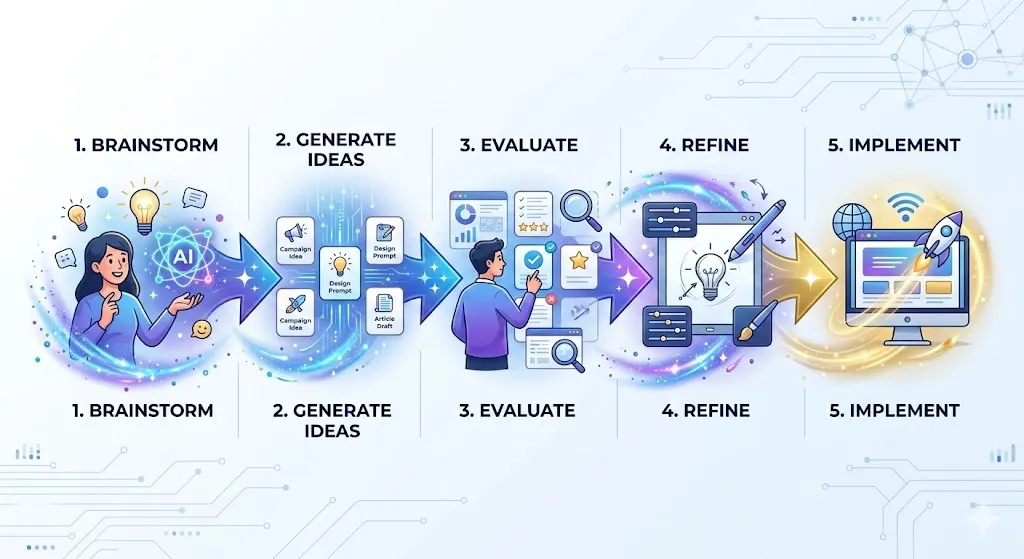
    Step-by-step brainstorming process flow with AI assistance

    Having access to AI tools is one thing. Using them effectively to unlock breakthrough ideas is another. Let’s explore battle-tested strategies that professionals use to maximize creative output with AI assistance.

    The Prompt Engineering Method

    Your results from AI directly depend on question quality. Vague prompts produce mediocre ideas. Specific, well-structured prompts generate exceptional output. This is called prompt engineering—the skill of crafting questions that extract maximum value from AI systems.

    Example Weak Prompt: “Give me some blog post ideas about marketing.”

    Example Strong Prompt: “Generate 20 unique blog post ideas for a B2B SaaS company targeting marketing directors. Each idea should address a specific pain point these directors face when implementing marketing automation. Include potential CTAs that drive demo signups. Format as title, pain point addressed, and suggested CTA.”

    The difference? The strong prompt provides context, specifies format, includes constraints, and defines success criteria. This focuses AI output toward actually usable ideas rather than generic suggestions.

    The Divergent-Convergent Method

    This two-phase approach mirrors how elite creative teams work. First, diverge—generate numerous ideas without judgment. Second, converge—evaluate and refine those ideas into actionable concepts.

    Phase 1 – Divergence (Quantity Focus): Ask your AI tool to generate 50-100 variations of an idea. Don’t filter for quality yet. Just capture volume. This phase typically takes 15-30 minutes with AI versus days with traditional brainstorming.

    Phase 2 – Convergence (Quality Focus): Review generated ideas and ask your AI to develop the top 5-10 in greater detail. Expand on feasibility, add tactical steps, consider counterarguments. This refinement transforms raw concepts into implementation-ready strategies.

    The Constraint-Based Innovation Method

    Counterintuitively, constraints fuel creativity rather than limiting it. By adding specific limitations to your AI prompts, you guide the system toward more innovative solutions. Netflix’s design constraints (16×9 aspect ratio, fast-cut trailers) didn’t reduce creative quality—they enhanced it.

    Example: Instead of “Create social media content ideas,” try “Create social media content ideas for TikTok using only text overlay on solid color backgrounds, maximum 10 seconds, designed for users scrolling during commutes.” The constraints dramatically improve relevance and creativity.

    The Cross-Domain Inspiration Method

    Some of history’s greatest innovations emerged from combining unrelated fields. Velcro came from observing burrs on clothing. The Wright brothers’ aircraft borrowed principles from bicycle engineering. AI excels at this cross-domain mixing.

    Ask AI to solve your creative challenge by borrowing from completely unrelated industries. “How would a luxury hotel approach this problem?” “What would a video game designer do?” “If this were a physical product instead of a service, what would change?” These perspective shifts often unlock breakthrough ideas.

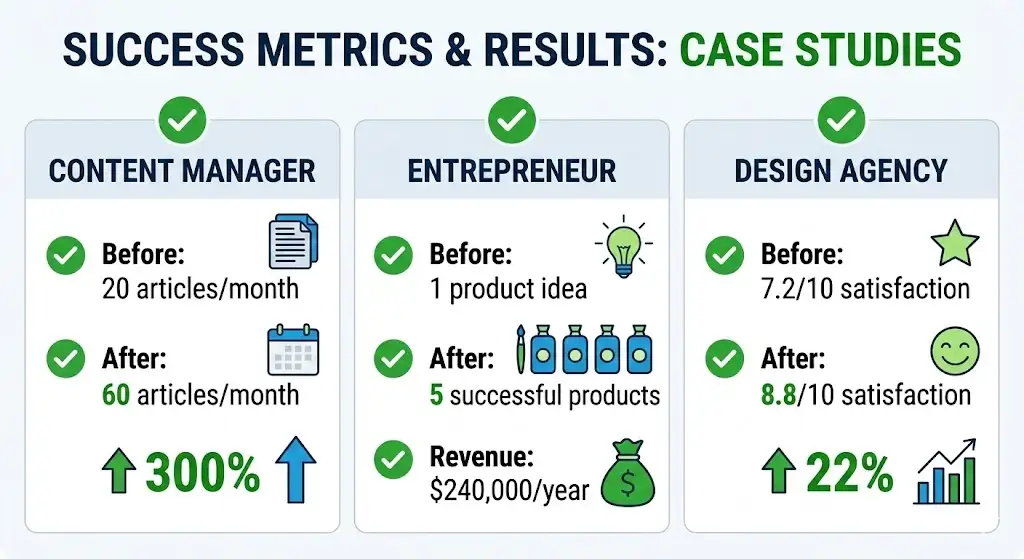
    Case Study 1: Content Marketing Manager Increases Output by 300%

    Situation: Sarah, a solo content marketer at a growing tech startup, faced overwhelming demand for blog posts, social content, and email newsletters. She was burning out.

    AI Solution: She implemented a weekly AI brainstorming session, using Claude to generate 30 blog post ideas, 20 social media angles, and 10 email newsletter concepts every Monday morning. This took 45 minutes with AI versus 10+ hours with traditional ideation.

    Results: Content output increased 300% within two months. More importantly, quality improved because Sarah could be selective, focusing on polishing the best ideas rather than scrambling to find any ideas. Her team traffic increased 45%, and engagement rates improved by 38%.

    Key Takeaway: AI isn’t about replacing the creative professional. It’s about multiplying their impact by eliminating the bottleneck of initial idea generation.

    Real Case Studies: AI Creativity in Action

    Case study results showing 300% increase in content output

    Theory only takes us so far. Let’s examine real-world examples of how creators and entrepreneurs are using AI to dramatically improve their creative output and business results.

    Case Study 2: Entrepreneur Launches 5 Successful Products Using AI Ideation

    Background: James, an aspiring entrepreneur, struggled with the biggest challenge many face: validating product ideas before investing time and money.

    AI-Powered Process: He used ChatGPT to brainstorm 200+ product ideas solving specific problems in his target market. For each idea, he asked AI to: research market size, identify potential customer segments, suggest marketing angles, and predict common objections. This comprehensive analysis took hours instead of weeks.

    Results: From 200 ideas, he refined to 20 promising concepts, then tested 5 in the market. Four gained significant traction. Two years later, these products generate $240,000 in annual revenue. Without AI acceleration, he estimates this achievement would have taken 5-7 years.

    Critical Success Factor: He didn’t use AI to avoid thinking. Instead, he used AI to explore more possibilities, then applied human judgment to select winners. The combination proved unbeatable.

    Case Study 3: Design Agency Triples Client Satisfaction Scores

    Challenge: A creative agency struggled with a common client problem: when presenting design concepts, clients often felt options were too similar, or didn’t include their preferred direction.

    AI Integration: The agency started using DALL-E 3 and Midjourney to generate 50-100 design concept variations for each client project. Instead of presenting 3 options (the traditional approach), they could present 10-15 directions covering different aesthetics, approaches, and styles.

    Impact: Client satisfaction scores jumped from 7.2/10 to 8.8/10. Project timelines shortened by 25% because clients found their preferred direction faster. The agency charged premium rates for this enhanced service, increasing profitability while improving outcomes.

    Lesson: Abundance of good options increases satisfaction more than perfection of limited options.

    Industry Trends: Where AI Creativity Is Growing Fastest

    Certain industries are embracing AI-powered creativity faster than others. Understanding these trends reveals opportunities for your own creative work:

    • Digital Marketing: Email subject lines, ad copy, and social media content see fastest AI adoption (87% of agencies use it)
    • Content Creation: Blog post outlines, headline ideas, and content angles widely generated with AI (72% of creators)
    • Product Development: Feature ideation and product naming increasingly AI-assisted (58% of product teams)
    • Visual Design: Concept generation and mood boarding rapidly shifting to AI-first (63% of design teams in 2026)
    • Video Production: Script ideation, thumbnail concepts, and storyboard generation growing AI usage (45% of video creators)

    Common Mistakes When Using AI for Creative Work

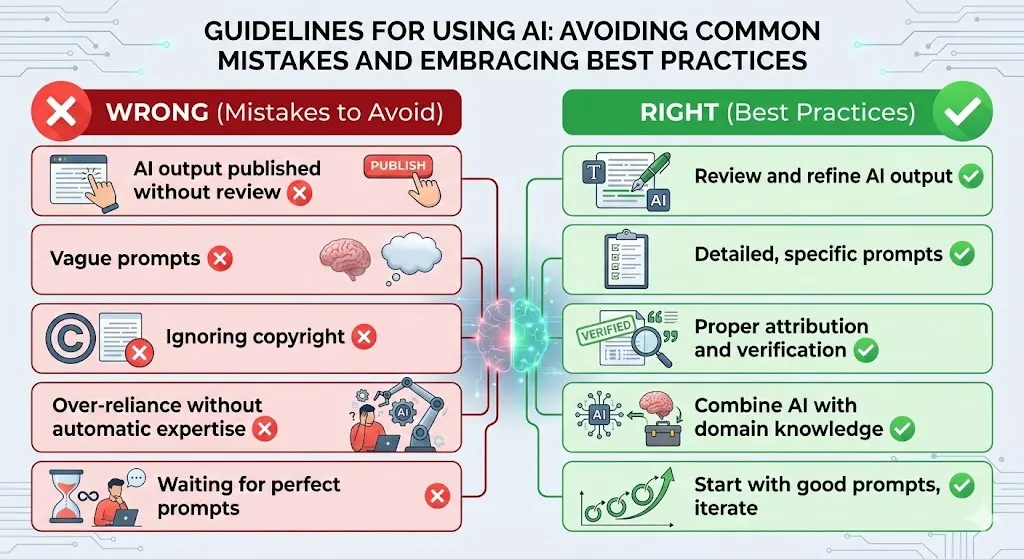
    Visual checklist of common AI creativity mistakes and best practices 

    While AI is powerful, misusing it can lead to mediocre results. Let’s examine mistakes that undermine creative quality and how to avoid them.

    Mistake 1: Publishing AI Output Directly Without Human Refinement

    This is the most common error. AI generates great raw material, but it often lacks the personal voice, brand specificity, and human insight that makes content truly exceptional. The mistake isn’t using AI—it’s treating AI output as finished work.

    Correct Approach: Use AI to generate 80% of the work, then spend 20% of your time refining, personalizing, and enhancing. This ratio reverses your old workflow where you spent 80% generating and 20% polishing.

    Mistake 2: Vague Prompts Expecting Specific Results

    If you ask AI a generic question, you’ll get generic answers. Many people underestimate how much specificity matters. “Give me content ideas” produces far inferior results compared to “Give me content ideas for 25-35 year old female entrepreneurs in sustainable fashion, struggling with supply chain management.”

    Fix: Invest 5 minutes crafting detailed prompts. Include audience specifics, business context, desired tone, format requirements, and success metrics. Better prompts = exponentially better output.

    Mistake 3: Ignoring Copyright and Attribution

    While AI output is technically original, it’s trained on billions of existing works. Some output may inadvertently resemble copyrighted content. Additionally, ethical and legal requirements around AI usage disclosure are evolving. Always disclose AI usage in content creation, verify original ideas, and understand your jurisdiction’s AI regulations.

    Mistake 4: Over-Relying on AI Without Domain Expertise

    AI is a tool for amplifying expertise, not replacing it. Someone deep in their field using AI makes better decisions than someone new to a field using AI. The domain expertise provides judgment to evaluate which AI suggestions are valuable versus which are off-base.

    Application: If you’re new to your field, use AI to accelerate learning but maintain healthy skepticism of all output. If you’re experienced, use AI to expand your already-solid foundations into new territories.

    Mistake 5: Waiting for Perfect Prompts

    Paradoxically, the other mistake is being too perfectionist about prompts. The best learning happens through experimentation. Start with good prompts, get output, learn from results, refine prompts, repeat. This iterative process typically produces better results faster than trying to engineer the perfect prompt from scratch.

    Remember: AI creativity tools are like any powerful technology—the quality of results depends entirely on user skill and intent. Treated as shortcuts to avoid thinking, they produce mediocre output. Used as amplifiers for thoughtful creativity, they produce exceptional results.

    Frequently Asked Questions About AI and Creativity

    Q1: Will AI Replace Creative Professionals?

    Answer: Not likely in the foreseeable future. Instead, AI is shifting what creative professionals do. Rather than spending 80% of time on initial ideation and 20% on refinement, the split inverts. AI handles rapid ideation; humans handle judgment, strategy, and unique voice. The creative professionals who thrive are those who embrace AI as a tool rather than resist it.

    Q2: What’s the Learning Curve for Using AI Creatively?

    Answer: The basics—using ChatGPT or Claude to brainstorm—takes minutes to learn. Most people generate usable ideas in their first session. However, advanced prompt engineering and understanding how to maximize different AI systems takes weeks to months of experimentation. Think of it like photography: basic usage is instant, mastery requires practice.

    Q3: Is Using AI for Creative Work Considered Cheating?

    Answer: This perspective is rapidly shifting. Major creative competitions increasingly allow AI-assisted work with disclosure. Most professional standards now require transparency about AI usage rather than prohibiting it entirely. The ethical standard is honesty about your process, not avoiding AI. Using a calculator doesn’t make you a bad mathematician; using AI doesn’t make you a bad creator. What matters is your overall contribution.

    Q4: What’s the Cost of Using AI for Creative Ideas?

    Answer: This varies widely. You can start free with ChatGPT’s free tier or Claude’s free plan. For advanced usage, most professional tools cost $10-30/month. For a creator or entrepreneur whose time is valuable, this investment typically pays back within days through increased productivity and better ideas.

    Q5: How Do I Choose Between Different AI Tools?

    Answer: Start with one free tool (ChatGPT or Claude) and master it before adding others. Different tools have different strengths: ChatGPT excels at speed and versatility, Claude at nuanced reasoning, Gemini at multimodal creativity. Once you understand your specific needs, you can identify the optimal tool. Most professionals use 2-3 tools rather than one.

    Q6: Can AI Help With Every Type of Creative Work?

    Answer: AI currently works best with text-based creativity (copywriting, ideation, strategy), visual concept generation (mood boards, design directions), and analytical work (market analysis, trend identification). It’s less effective with highly technical creative skills requiring specialized domain knowledge (advanced architecture, complex music production) but even these are evolving rapidly.

    Taking Your First Steps With AI for Creative Ideas

    The integration of artificial intelligence into creative work represents one of the most significant shifts in creative industries in decades. Unlike previous technological revolutions that displaced workers, AI for creativity primarily empowers existing creators and entrepreneurs to accomplish more, better, faster.

    The creators and entrepreneurs winning in 2026 aren’t those resistant to AI. They’re those who’ve integrated it strategically into their workflow, understanding both its tremendous potential and its limitations. They use AI to multiply their creative output, not to substitute for genuine creative thinking.

    Your Action Plan

    Week 1: Choose one free AI tool (ChatGPT or Claude). Spend 30 minutes exploring its capabilities with your creative challenge. Don’t worry about perfection—just experiment.

    Week 2-3: Implement one concrete strategy from this guide. Whether it’s the divergent-convergent method, constraint-based innovation, or cross-domain inspiration, pick one and apply it to an actual project.

    Week 4: Evaluate results. Did this approach generate better ideas? Faster? More abundance? Adjust and refine your approach based on results.

    Month 2+: Add complexity. Try multiple tools, refine your prompts, explore advanced techniques. Build your personal system for AI-powered creativity.

    The future of creativity isn’t human versus AI. It’s human plus AI. The most valuable creative professionals aren’t the best individual ideators anymore—they’re the best at directing intelligent systems to generate possibilities, then exercising judgment to select and refine winning ideas. That’s a skill you can develop starting today.

    “The best time to start using AI for creative work was a year ago. The second-best time is today. In five years, not using AI for creative amplification will be as outdated as refusing to use the internet.”

    — Innovation strategist observation, 2026

    Your creative potential has never been higher. The tools to unlock it are available right now. The question isn’t whether AI creativity is worth exploring—it’s why you’d wait any longer to start.